Prisma Browser for Business
Your secure workspace designed for small business with built-in AI controls
Learn more
Most advice on cybersecurity for small businesses starts with familiar actions. Use strong passwords. Train employees. Keep software updated. Enable multifactor authentication.
That advice isn't wrong. But it rarely accounts for the environments it's given to.
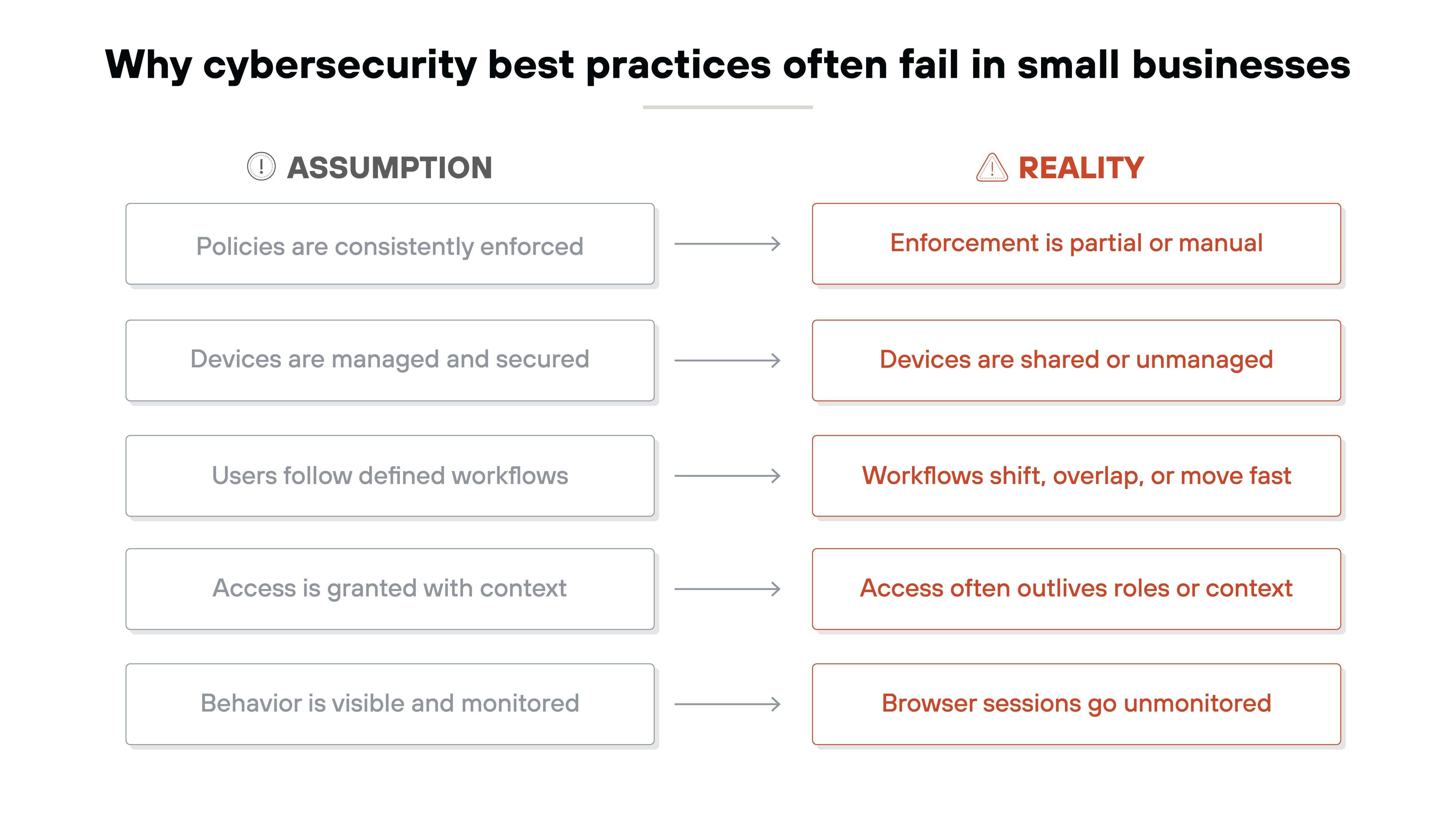
Small businesses deal with constraints that larger organizations don't. They rely on a mix of personal and shared devices. They support remote work without dedicated IT staff. Their environments change quickly, and security tools don't always keep up. Even when policies exist, enforcement is often partial or inconsistent.
That's where best practices break down.
A policy that assumes full visibility won't hold up if users are logging in from unmanaged laptops. A training program won't prevent every mistake. Especially when workflows depend on speed and improvisation. A control that works in one part of the environment may be missing entirely in another.
So while the guidance may be sound in principle, it often fails in practice. Not because it's ignored. But because it can't be applied cleanly across fragmented systems and real-world behavior.
That's not negligence. It's architecture. And it's where most risks quietly take shape.
1. Control access to business applications—not just user accounts
- Apply access policies at the app level. Not just usernames and passwords.
- Turn on conditional access based on device, location, or session context.
- Require reauthentication after idle time or on shared devices.
- Block session persistence where you can.
- Restrict risky actions like file exports on unmanaged devices.
Why this matters:
Most small businesses rely heavily on cloud apps. Email. Accounting. Scheduling. Document sharing. It's how work gets done.
That access is usually tied to individual accounts. Which sounds secure until you consider how easy it is for access to drift. A shared laptop. An old contractor login. A personal device used in a pinch.
The risk isn't just unauthorized users. It's authorized users accessing business apps under the wrong conditions. On the wrong device. Through an unmonitored session.
That's why access control needs to go beyond identity. It needs to include context. What's the device? Is it managed? Is the session secure? Are downloads allowed?
This kind of enforcement is especially important in small environments where users often wear multiple hats, share logins, or work from home. Because once someone's in, the system assumes everything that happens next is safe. That's where small business exposure tends to grow unnoticed.
Why it fails:
In practice, most small businesses don't have a clean inventory of who's using what. Access gets granted informally. And rarely revoked. Devices aren't always managed. Browsers stay logged in. Policies exist, but they don't follow the user into the session.
And that's the real issue.
When enforcement stops at the login screen, business apps are left open to risk. Not because someone broke in. But because no one had visibility into what happened next.
Access control only works if it holds up across all the ways people actually use the system. And in small business environments, that almost always includes edge cases.
Tip:
Even when access is secure at login, risk increases if sessions stay open too long. Use shorter timeouts and activity-based reauthentication to reduce drift. Especially in shared or unmanaged environments.
| Further reading:
COMPARISON
Prisma for Business vs. Consumer Browsers: See the difference.
View Datasheet
2. Reduce phishing risk beyond email filtering and training
- Monitor what happens after a phishing email is clicked instead of just whether it was delivered.
- Use browser-based controls to flag suspicious logins and credential prompts.
- Block access to known malicious domains at the DNS or browser level.
- Restrict form-filling or password entry on untrusted pages.
- Limit app actions—like file access or data entry—if the session wasn't launched from a trusted source.
Why this matters:
Phishing is still one of the most common ways attackers get in. Not because people don't know better, but because phishing has adapted. Today's attacks often use real websites, trusted domains, and infrastructure that looks legitimate. Many bypass spam filters entirely.
The problem isn't that users fall for obviously fake emails. It's that attackers have figured out how to exploit gray areas. A link looks normal. A login page seems familiar. And in small environments, one click is often all it takes.
Email filters and training help. But they only go so far. Training can raise awareness. It can't stop a real-time decision. And filters don't cover what happens after a message is opened.
Which means the risk doesn't end at the inbox. It continues in the browser. That's where credentials get entered, apps get accessed, and data gets exfiltrated. If there's no control at that point, the defense ends too early.
Why it fails:
Small businesses often rely on policies and reminders. But policy doesn't prevent someone from logging in to a spoofed site. Or entering a password into a malicious prompt. Especially when those moments happen fast, under pressure.
Once the user is in the browser, most defenses drop away. There's no visibility into what they click, where credentials go, or what actions follow. If malware isn't involved, the event may not trigger any alerts.
That's the failure point.
Not the user. Not the tool. The assumption that risk stops at the email. It doesn't. And without controls that extend into the session itself, phishing remains a risk. Even in environments that think they've already solved it.
Tip:
To reduce post-click phishing risk, look for tools that can limit user input, like blocking password entry on suspicious pages or restricting actions in untrusted sessions.
3. Protect sensitive data where it's actually handled
- Track how data moves in the browser, not only where it's stored.
- Restrict uploads, downloads, or copy-paste actions in sensitive apps.
- Block access to file-sharing or unsanctioned tools based on policy.
- Set rules for what data can leave a browser session, and where it can go.
- Use session-aware controls to apply limits even on unmanaged or shared devices.
Why this matters:
Most small businesses already have protections in place for data at rest. Files are stored securely. Backups are running. Devices may be encrypted.
But data isn't just sitting still. It's being viewed, downloaded, copied, and uploaded constantly. Especially through web-based apps. This is data in motion. And it's where most small businesses lose visibility.
Why?
Because controls often focus on the system, not the interaction. A cloud storage app might be secure. So might the endpoint. But what about the moment in between: when a user pastes something into a web form or drags a file into a browser window?
That's the critical gap. Not where the data lives. But where it's actively being used.
Why it fails:
Most small businesses don't have dedicated tools to monitor or restrict these behaviors. And traditional data loss prevention (DLP) solutions can be too complex, expensive, or rigid to deploy effectively.
So even with the right policies, enforcement is limited. Users can download customer records to personal devices. Or upload sensitive files to tools that aren't approved. And it often happens through browser-based workflows that security tools don't fully control.
The result?
Data flows out of the organization through normal activity because the system wasn't built to monitor the moment it happens.
Tip:
Sensitive data is easiest to lose in the places you're least likely to see it, like browser uploads, web forms, and session-based copy/paste. Make sure enforcement and visibility meet where the data is actually moving.
| Further reading:
4. Assume unmanaged and shared devices will be used
- Allow access from unmanaged or shared devices, but apply stricter session controls.
- Limit what users can do when they sign in from an unknown or untrusted device.
- Disable downloads, local storage, or copy actions on shared systems.
- Require reauthentication more frequently on unmanaged devices.
- Monitor sessions closely when device posture can't be verified.
Why this matters:
Many small businesses aim to restrict access to managed devices only. In practice, that standard is hard to maintain.
Work happens wherever it needs to. A personal laptop at home. A shared front-desk computer. A device borrowed to get something done quickly. These situations are common, not exceptional.
Which means device control is often inconsistent.
When business applications are accessed from unmanaged or shared devices, security assumptions change. There may be no endpoint protection. No device visibility. No way to confirm how data is stored or handled after access.
That gap matters. Because once access is granted, systems often treat the session as trusted regardless of the device behind it.
Why it fails:
Many organizations respond by trying to block access entirely. Managed devices only. No exceptions.
However, that approach rarely holds. Users find workarounds. Credentials get reused. Access shifts to whatever device is available. And visibility is lost anyway.
Unmanaged devices aren't the problem. The problem is when controls assume every device is known, trusted, and fully managed.
When policies assume full device management, enforcement breaks at the edge. Sessions happen outside expected conditions. Activity goes unmonitored. And risk increases quietly through normal use.
Assuming unmanaged and shared devices will be used isn't lowering the bar. It's acknowledging reality and designing controls that still work when ideal conditions don't exist.
Tip:
When you can't trust the device, isolate risk to the session itself. Look for ways to restrict access to sensitive apps or features unless specific security conditions are met. Even if the device isn't managed.
5. Limit trust inside the environment vs. solely the perimeter.
- Remove unused accounts and revoke access when roles or vendors change.
- Assign the fewest permissions necessary for users to do their job.
- Monitor app usage and look for signs of privilege creep over time.
- Use time-based or session-based access wherever possible.
- Avoid assuming that access granted once should be trusted indefinitely.
Why this matters:
In small environments, it's common for everyone to have broad access. It saves time and avoids complexity. But it also means trust is granted once and rarely revisited.
That's where problems start. A former employee's account doesn't get deactivated. A contractor retains access to sensitive data. A junior team member has admin rights they no longer need. Over time, this quiet buildup of trust creates paths for misuse whether intentional or not.
Perimeter defenses assume that once you're inside, you're trusted. But modern risk comes from within the environment, not just outside it. And the longer trust stays unchecked, the more fragile the system becomes.
Why it fails:
Small businesses rarely have the time or tools to revisit access on a regular basis. Policies exist, but enforcement depends on memory or manual cleanup.
That's where trust drifts. A quick exception becomes permanent. A short-term role becomes a backdoor. And because the access looks legitimate, it's hard to catch until something breaks.
This isn't just about breach risk. It's about visibility. If no one knows who can do what, then no one knows what's happening. Or what shouldn't be.
Tip:
In environments with broad internal access, look for session-based or secure browser tools that can adjust permissions as conditions change, like reducing access mid-session if the risk level increases.
| Further reading:
6. Maintain visibility where work actually happens
- Monitor activity inside browser sessions in addition to network and device layers.
- Track what users do in SaaS apps: logins, file access, and risky behavior patterns.
- Flag access from unusual locations or session types, even if credentials are valid.
- Apply controls that follow the user and session, regardless of device.
- Correlate browser activity with user identity and app context to detect misuse early.
Why this matters:
Many small businesses think they have visibility because they've deployed antivirus software, turned on logging, or configured network firewalls. But most modern work doesn't happen at the network or system level anymore.
It happens in the browser.
That's where users log in to SaaS apps, move data, approve payments, and share information. It's also where many attacks unfold using legitimate credentials and normal-looking behavior. Without visibility into those sessions, it's easy to miss the signs of compromise until it's too late.
Attackers aren't always loud. In fact, they often rely on the fact that no one's watching.
Why it fails:
Traditional tools focus on endpoints, infrastructure, or alerting once something breaks. But small businesses aren't equipped to correlate those signals or respond fast enough when they do appear.
More importantly, those tools miss where most user activity actually happens.
Browser-based work sessions often go unmonitored. So when an attacker uses valid credentials, moves data out of a trusted app, or accesses something unusual, the activity doesn't look suspicious because nothing in the system sees it.
The risk isn't that something was missed after the fact. It's that nothing flagged it to begin with.
Tip:
Don't rely on login alone. Limit session duration and require reauthentication when risk increases. Especially on shared or unmanaged systems where access can drift quickly.
Why the browser has become a control point for small business cybersecurity
Throughout this article, the same failure shows up in different forms.
Access is granted under the wrong conditions. Phishing succeeds after the click. Data leaves through normal workflows. Devices are shared or unmanaged. Permissions drift. Visibility disappears.
These failures don't share a single cause. But they converge in the same place.
The browser.
"85% of work happens in the browser. 95% of organizations have faced a browser-based attack in the past year."
It's where users log in to cloud apps, handle sensitive data, and make real-time decisions. It's also where attackers operate—quietly—once they have valid credentials. And it's where traditional tools lose context.
Network controls don't see SaaS activity. Endpoint agents don't always run. Policies exist, but they don't follow the session.
That's why the browser has become a logical control point.
It's the one layer that sees everything: user identity, session activity, app behavior, and data movement—regardless of device or location. And often, it's the only place left to enforce policy when everything else falls short.
This shift has created a new category of security tools. Secure browser products are designed to apply policy at the session level—across users, devices, and apps—without overhauling the environment.
They're not a fit for every use case. But they're built for exactly the problems described here. And if you're seeing these breakdowns in your own environment, it may be time to consider whether the browser is where your next layer of control needs to go.
| Further reading: